
Homeschool Curriculum for Personal Finance
Recently, my oldest received her first check made out to her directly, from an award she had earned. We decided to use it as an opportunity to open her a bank account. We also started looking for a homeschool curriculum for personal finance to help her learn to managing her money well. Through the Homeschool Review Crew, we were able to try out products from Personal Finance Lab as we learned more about Personal Finances together.
We took a break from our usual math curriculum for a unit study on Finances using the Budgeting Game, Stock Market Game and integrated curriculum from PersonalFinanceLab.com. We want to set up our kids for financial success by instilling in them good habits from the beginning. The Budget Game let my student explore what it’s like to have a budget in a simulation game, where surprises come up and you have to make choices on how to pay for them.

Setting Up the Game
Personal Finance Lab is designed to be used in a classroom setting. It has many features that make this work well has a hands-on learning tool. Using it as a homeschool family is more challenging. The set up process includes a variety of options that impact group play and stock trading options and lesson modules. While a high school teacher would be well versed in these terms, as a homeschool parent it is more overwhelming to choose the best options. Having an easy default setting would have been helpful. The email with the information to add my student accounts went to my spam, so watch for that when you are setting up the accounts. You can choose to set up a variety of lessons for your students to complete. Some of the lesson topics include Personal Finances, Investing, Economics and Career Explorations.
Lessons and Game Play
Once the game is set up and you have assigned the lessons to your students, they can log in and get started. My student was able to log in and start playing right away, and there is a short tour the first time you log in, to orient you to the dashboard. On the dashboard you can see your progress on either the Budget Game or Stock Game. Our family chose to explore the Budget game the most, since our goal was learning about Personal Finances and money management.
The Budget Game-
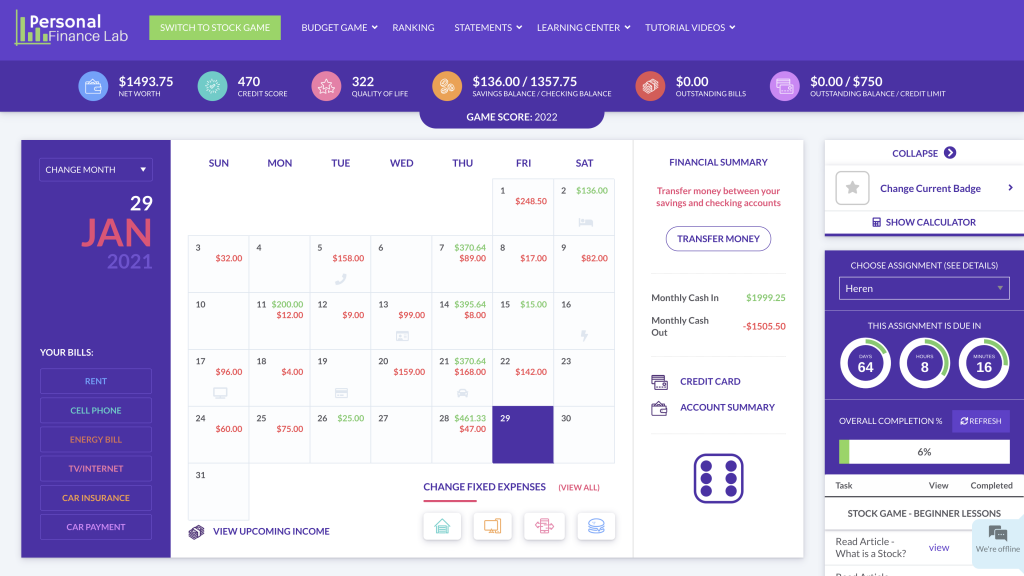
In the set up process you can choose the starting numbers for the Budget game, but when the student starts they will make their own choices for their utilities. They can choose to have less or more expensive options around your initial settings to choose their quality of life. At the beginning of the month you calculate your expected earning for the month and review your expected expenses. You can see on the calendar game board when each bill is published and when it is due. Each time you roll the dice you will have choices to make about how you spend your money. Sometimes you can choose not to spend money but not always. You also have the choice between using credit and debit cards when you have an expense.
The game isn’t only about the bottom line of the checkbook. Each player also had a quality of life score that changes as they make different choices as well. Each Saturday, you get to choose how you spend your free time from one of the four options. If you choose to spend your weekends always at work may see your grades suffer and have to pay more later for a tutor. Again, it’s all about balanced choices the student makes. As you play the game lessons will pop up to provide teachable moments. Correct answers to the quiz questions reward the student with bonus cash in the game. If you are using a Chromebook or device with a smaller screen the calendar game board may not quite fit on your screen at once and you will need to scroll up and down constantly to see everything.
The Stock Game-
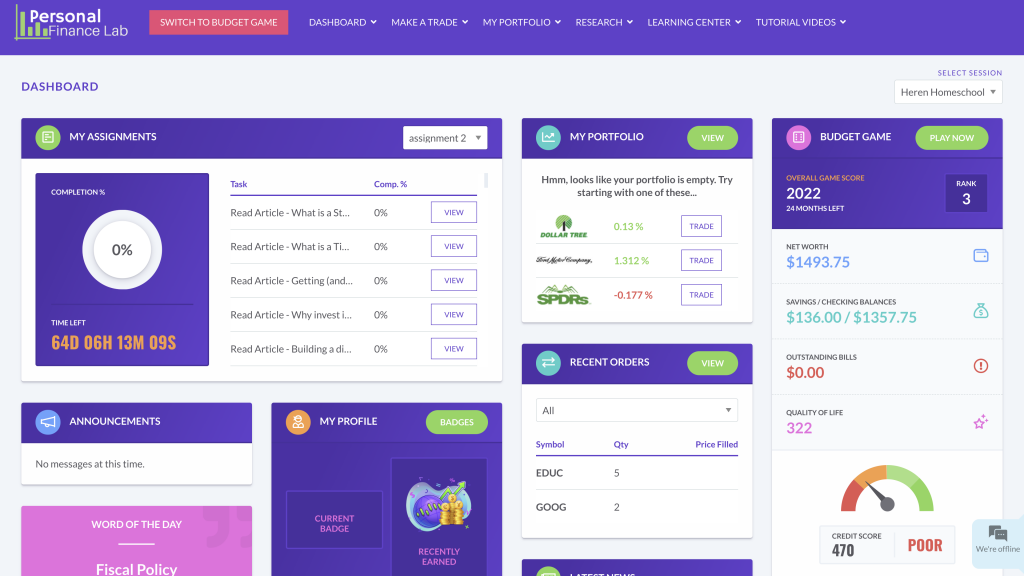
Getting started trading stocks was less intuitive for my student. The dashboard displays the assigned lessons more prominently than the Budget Game. This provides a starting place to learn about Stock Trading and investing. It was easier to get lost among the information when trading. The strength of The Stock Game is the real time market information provided within the platform. Students can research the companies they want to invest in directly in the platform, as well as track how each purchase is doing without leaving the game. When you use it in a group setting or even within the family you can compare portfolios and see who is doing better, as a way to provide healthy competition.
Final Thoughts
Using the Personal Finance Lab Budget Game was a great homeschool curriculum for personal finance. Making a budget on paper is important to do and included in each month of game play. But the more valuable lesson of the game was the surprise expenses. Teaching students how their small choices add up to their financial success or failure is vital. Adults use the term “managing money” and that is exactly what the Budget game teaches is how to balance their small choices so they can still have extras while still paying the bills and building a savings account. My child is not a strong math student but during this unit study, she looked forward to doing her lessons. Managing money is an important life skill I hope her enthusiasm continues as they apply these skills to her brand new bank account as well.
If you want to see what others thought of Personal Finance Lab, visit the Homeschool Review Crew to read more reviews.
